
iperf3 is the go-to open-source tool for measuring real-world throughput, jitter, and packet loss between any two endpoints — from data-centre fabrics to home Wi-Fi links.
iperf3 is a complete rewrite of the original iperf2, with a cleaner codebase, richer JSON output, and active maintenance. It operates in a client–server model: one host listens, the other connects and drives traffic.
If you only install one network diagnostic tool, make it iperf3 — bandwidth tests to jitter measurements in a single binary.
Key capabilities: measures TCP bandwidth and UDP jitter / packet loss, supports reverse mode, runs multiple parallel streams, outputs structured JSON, and works on Linux, macOS, Windows, and BSD.
Download the pre-built binary from https://iperf.fr/iperf-download.php, extract, and run iperf3.exe from PowerShell or Command Prompt.
iperf3 uses a simple client–server model. One host listens, the other connects and drives the test.
| Role | Behaviour |
|---|---|
| Server | Listens on port 5201. Waits for a client. One client at a time by default. |
| Client | Connects to the server, negotiates test parameters, sends or receives data for the test duration. |
| Flag | Description | Example |
|---|---|---|
| -s | Server mode | iperf3 -s |
| -p <port> | Custom listen port | iperf3 -s -p 9000 |
| -B <host> | Bind to a specific interface | iperf3 -s -B 192.168.1.10 |
| -D | Run as background daemon | iperf3 -s -D |
| -1 | Exit after one client | iperf3 -s -1 |
| --logfile <f> | Write output to file | iperf3 -s --logfile /var/log/iperf3.log |
| -J | JSON output | iperf3 -s -J |
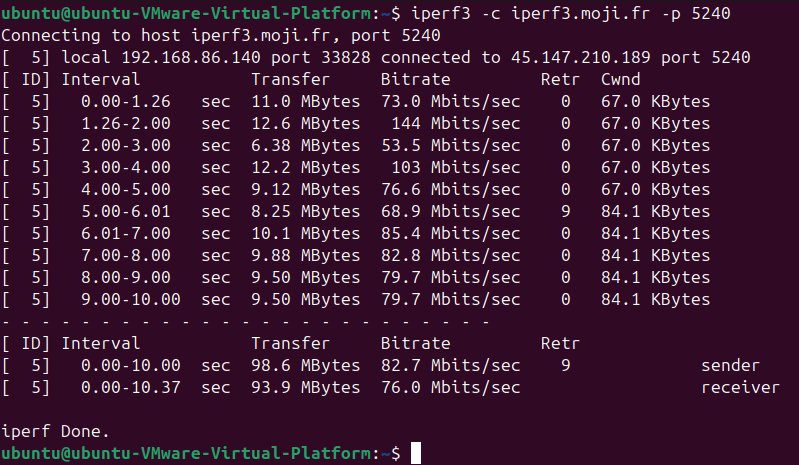
Runs a 10-second TCP test and prints throughput results.
| Flag | Description | Example |
|---|---|---|
| -c <host> | Client mode, connect to host | iperf3 -c 10.0.0.1 |
| -p <port> | Target server port | iperf3 -c 10.0.0.1 -p 9000 |
| -t <sec> | Test duration (default 10s) | iperf3 -c 10.0.0.1 -t 30 |
| -n <bytes> | Transmit fixed bytes | iperf3 -c 10.0.0.1 -n 1G |
| -P <n> | Parallel streams | iperf3 -c 10.0.0.1 -P 4 |
| -u | UDP mode | iperf3 -c 10.0.0.1 -u -b 100M |
| -b <bps> | Target bandwidth | iperf3 -c 10.0.0.1 -u -b 500M |
| -R | Reverse mode (server→client) | iperf3 -c 10.0.0.1 -R |
| --bidir | Simultaneous bidirectional | iperf3 -c 10.0.0.1 --bidir |
| -i <sec> | Report interval | iperf3 -c 10.0.0.1 -i 2 |
| -w <size> | TCP window / socket buffer | iperf3 -c 10.0.0.1 -w 512K |
| -J | JSON output | iperf3 -c 10.0.0.1 -J |
| -4 / -6 | Force IPv4 or IPv6 | iperf3 -c ::1 -6 |
| --dscp <val> | Set DSCP/TOS bits | iperf3 -c 10.0.0.1 --dscp 46 |
| TCP | UDP | |
|---|---|---|
| Primary metric | Throughput (Mbps / Gbps) | Jitter & packet loss |
| Bandwidth control | Auto — fills the pipe | Required with -b flag |
| Typical use case | File transfers, HTTP, bulk data | VoIP, video streaming, gaming |
| Key output fields | Bitrate, Retr, Cwnd | Bitrate, Jitter, Lost/Total |
| Field | Meaning |
|---|---|
| Interval | Time window for each report |
| Transfer | Data moved in the interval |
| Bitrate | Throughput in that interval |
| Retr | TCP retransmissions — high values indicate congestion or loss |
| Cwnd | TCP congestion window size |
| sender / receiver | Final summary row for each direction |
Additional UDP fields: Jitter (ms) and Lost/Total with loss percentage.
Create /etc/systemd/system/iperf3.service:
| Symptom | Cause & Fix |
|---|---|
| Connection refused | Server not running or port blocked — check firewall and confirm iperf3 -s is active |
| Very low / 0 throughput | Firewall dropping traffic — verify port 5201 is open for TCP and UDP |
| High Retr values | Network congestion or MTU mismatch — test jumbo frames with ping -s 9000 |
| server busy error | iperf3 handles one client at a time — wait, or restart the server |
| High UDP jitter | Check for packet loss; ensure -b matches the expected link speed |
| Permission denied | Ports below 1024 need root — use port 5201+ or run with sudo |
| Command | What it does |
|---|---|
| iperf3 -s | Start server on default port 5201 |
| iperf3 -s -p 9000 -D | Server on port 9000, background daemon |
| iperf3 -c <server> | Basic TCP test (10 seconds) |
| iperf3 -c <server> -t 30 -P 4 -J | TCP, 30s, 4 parallel streams, JSON output |
| iperf3 -c <server> -u -b 1G -t 20 | UDP test at 1 Gbps for 20 seconds |
| iperf3 -c <server> -R | Reverse mode — measure download speed |
| iperf3 -c <server> --bidir -t 15 | Simultaneous upload + download |
| iperf3 -c <server> -6 | Force IPv6 |
| iperf3 -c <server> -J > result.json | Save results to JSON file |
iperf3 --help or man iperf3.https://iperf.fr/iperf-servers.php